


Adding a custom-made Flash animation to Microsoft Frontpage 2003 is a snap. By following these simple steps, you will be up and running in no time at all and impressing all of your visitors with your talents! First create your Flash movie. Save The SWF file to your website directory preferable to the root or a sub directory of the website.
1.
Open Frontpage
2. Select the HTML page into which you want to insert the animation,
or start from scratch and open a new page.
3. Save the HTML file to your website directory
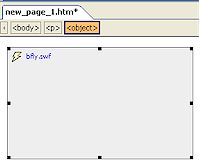
4. In Microsoft Frontpage 2003, Choose 'Insert | Picture | Movie
in Flash Format' from the menu bar and select the file. It will
look like this in the page:
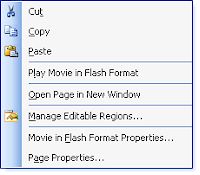
5. Right click on the Flash file in the page, select to 'Play Movie in Flash Format', which will play it in design mode without switching views.
6.
Right click on the Flash file and select 'Movie in Flash Format
Properties' which will allow you to change the size, transparency,
background colors and quality of the movie from the 'Appearance'
tab.
7. The 'General' properties tab lets you specify whether the
Flash movie can loop, auto play or to show menu on the file
when it's viewed on the web.

8.
Save the page and publish the files to your remote server.
9. There you have it, a nice simple way to add a little extra
pizzazz to your presentation!
